
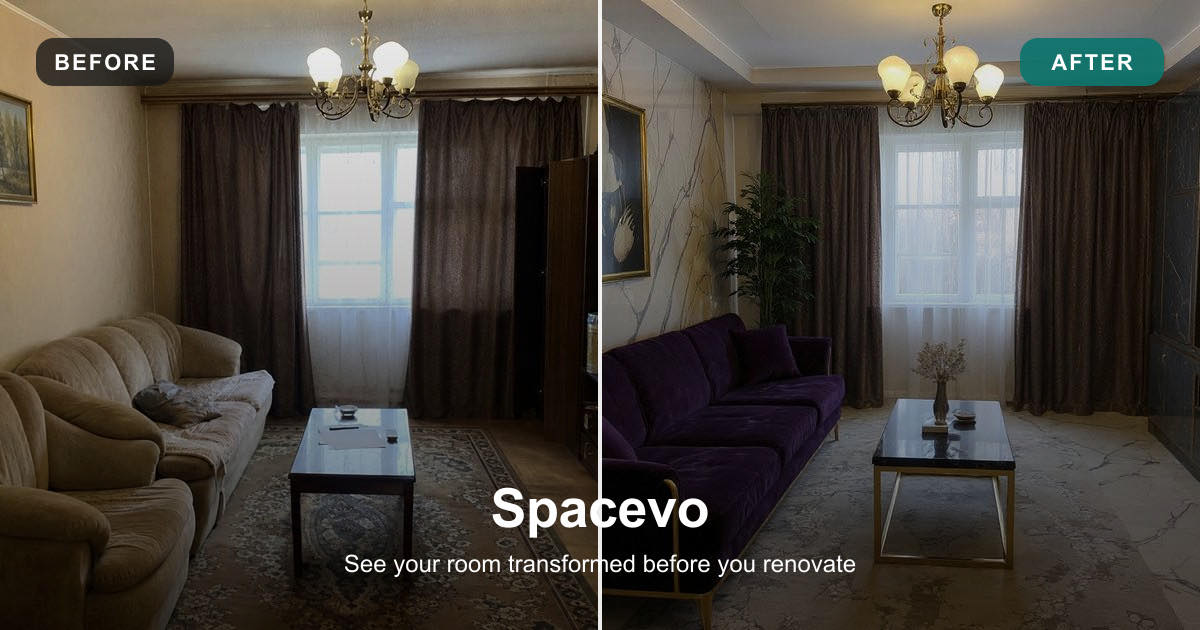
You upload one photo of your messy living room, pick a style, and a few seconds later you are looking at six different design concepts of that same room. The couch is gone, the walls are a different color, there is a rug that did not exist before, and yet it is unmistakably your room, shot from the same angle, with the same window in the same corner.
That is not magic, and it is not a designer working at superhuman speed. It is a stack of image generation models doing a fairly specific set of jobs. This post pulls that stack apart: how diffusion models generate imagery, how conditioning keeps the room recognizable, and how inpainting lets you change one object without touching the rest. By the end you should understand what is actually happening when a tool advertises an "AI room makeover," and why the results look the way they do.
What actually happens when AI "redesigns" a room
It helps to separate two things that get lumped together as "AI."
The first is image understanding — a model that looks at a photo and produces text, labels, or answers about it. The second is image generation — a model that produces pixels. A room makeover leans heavily on the second, but a good pipeline uses a bit of the first to figure out what it is looking at before it starts drawing.
When you hit the "redesign" button, a rough sequence runs:
- The system reads your photo and derives some structural information from it (edges, depth, room layout).
- A generative model produces a new image, guided both by your chosen style and by that structural information.
- Optionally, the system only repaints part of the image and leaves the rest of your original pixels untouched.
Steps 1 and 2 are where the interesting model work lives. Let's start with the engine that actually paints.
Diffusion models: the engine
Most modern image generators are diffusion models. The core idea is easier than the name suggests.
During training, the model is shown real images that have had noise added to them in small increments, until the picture is pure static. It learns to reverse that process — to look at a noisy image and predict a slightly cleaner version. Do that enough times, starting from random noise, and you walk the static back into a coherent image, one denoising step at a time.
On its own, that would give you a random plausible picture. The useful part is text conditioning. A separate text encoder turns a prompt like "Scandinavian living room, warm natural light, oak floor, minimal furniture" into a numerical representation, and that representation steers every denoising step. The model is not retrieving a stock photo of a Scandinavian room; it is generating pixels that statistically match what "Scandinavian living room" looked like across its training data.
This is the same family of technique behind Stable Diffusion and newer commercial engines like Seedream. The details differ — some operate in a compressed "latent" space for speed, some use different network architectures — but the loop is the same: start from noise, denoise repeatedly, let a prompt pull the result toward what you asked for. If you want a deeper look at how the internals of modern generative models are structured, the write-up on model architecture and how these systems are built covers the building blocks that show up here too.
The catch for interior design is obvious. Pure text-to-image generation will happily invent a beautiful Scandinavian room — but it will be a room, not your room. The window moves. The ceiling height changes. The perspective is wrong. That is useless if your goal is to see your actual space redecorated. Which is where conditioning comes in.
Keeping the room recognizable: conditioning and ControlNet
The trick that makes room makeovers work is image-to-image generation with structural conditioning. Instead of generating from scratch, the model treats your uploaded photo as a starting condition and is told, in effect: keep this geometry, change the surfaces.
There are a few standard ways to feed structure into a diffusion model, usually grouped under the ControlNet approach. Each one extracts a specific kind of map from your photo and uses it as an extra constraint alongside the text prompt:
- Edge maps (Canny). An edge detector traces the hard lines in your photo — the outline of the window frame, the corners where walls meet, the edge of the floor. Feeding those edges in as a constraint pins the layout in place.
- Depth maps. A depth estimator guesses how far each pixel is from the camera, producing a grayscale map of near-to-far. This preserves the sense of space and perspective, so a generated sofa sits at the right distance and scale rather than floating.
- Segmentation maps. The image is divided into regions — this blob is floor, that blob is wall, this is window, that is furniture. The model can then be told to restyle the "furniture" regions while respecting the "wall" and "window" regions.
Combine these and you get a strong skeleton. The diffusion model is still generating fresh pixels for materials, colors, and furnishings, but it is doing so inside a cage defined by your room's actual geometry. That is the honest, technical reason a good tool can keep your walls, windows, layout, and camera angle while changing everything on top of them. It is not "understanding" your room in a human sense — it is constrained by extracted maps of it.
This also explains a common frustration. When a cheaper tool warps your window into an archway or bends a straight wall, it is usually because the structural conditioning was weak or absent, and the generator was free to hallucinate. The strength of those constraints is a real engineering dial, and it is largely what separates a toy from something you would show a client.
Inpainting: changing just one thing
Sometimes you do not want a whole-room redesign. You like the room but hate the couch. This is where inpainting comes in.
Inpainting repaints only a masked region of an image and leaves every pixel outside the mask untouched. You (or the tool, automatically) define a mask — say, the area covered by the sofa — and the diffusion model regenerates only that region, using the surrounding pixels as context so the new object blends in with the existing lighting and perspective.
Mechanically, it is the same denoising loop, but restricted: at each step, the pixels outside the mask are held fixed to your original image, and only the masked area is allowed to change. Because the model can see the untouched surroundings, it matches shadows, reflections, and color temperature reasonably well.
For interior work this is the difference between "generate me a new room" and "swap this one object." Change the sofa, keep the coffee table. Repaint an accent wall, leave the flooring. It is a more surgical tool than a full makeover, and it is what you reach for when you already like 90% of a space.
From theory to a working product
Stacking these techniques into something a non-engineer can use is its own problem. It is worth walking through one product as a concrete example of the theory landing in a real workflow — not because the ideas are exclusive to it, but because it maps cleanly onto everything above.
Spacevo is an AI interior design tool where the flow is: upload a real room photo, choose a style, and get photorealistic redesigns back in seconds. Underneath, that maps onto the concepts we just covered:
- Its Structure Engine is the productized version of the structural-conditioning idea. It preserves the original walls, windows, layout, and the camera angle of your photo, so the redesigned image is still recognizably the same room rather than a generic lookalike. That is the ControlNet-style "keep the geometry, change the surfaces" constraint, packaged so you never see a depth map or an edge detector.
- It exposes inpainting for local edits, so you can restyle one part of a room instead of regenerating the whole thing — the surgical mode described above.
- Its higher-precision generation runs on a Precision Engine (Seedream 5.0) on the Pro tier, which is simply a more capable diffusion backend for finer detail.
- Around the core, there are features that are less about raw generation and more about workflow: virtual staging for empty rooms, reference fusion to borrow a look from another image, 360° panorama output, and render-to-video to turn a still result into a walkthrough clip.
On pricing, there is a free tier — one image, no credit card — to see the output on your own photo, and paid plans start at $39/month on the Starter tier. The point of naming all this is not the feature list; it is that each capability is a recognizable technique from the sections above, wired into a single upload-and-go pipeline. If you have read this far, you now know roughly what each button is doing under the hood.
The broader takeaway: an "AI room makeover" is not one model. It is a coordinated stack — structure extraction, conditioned diffusion, optional inpainting — and the quality of a tool comes down to how well those pieces are tuned to respect the room you actually photographed.
Why your chatbot can't do this
A reasonable question at this point: you already have a capable AI assistant. Why can't you just ask a general chatbot to redesign your room?
Because most chatbots are built for image understanding, not image generation. A multimodal language model can look at your room photo and describe it, critique the layout, or suggest a color palette in words. That is genuinely useful — and it is a different job from producing new pixels. The work on multimodal models that read and reason over images gets at this distinction: "seeing" an image and "drawing" a new one are handled by different model families with different training objectives.
A model that turns pictures into text cannot, by that same architecture, turn text back into a controlled, geometry-preserving picture of your specific room. You need a generative image model with the structural conditioning we described. The two capabilities increasingly ship side by side in the same products, but they are not the same component, and confusing them is why "just ask the chatbot" produces a written suggestion instead of a rendered design.
So the practical division of labor looks like this: a language model can help you decide what you want and describe it, and a conditioned diffusion pipeline can render it on your actual room. A tool like Spacevo sits on the generation side of that line.
Frequently Asked Questions
How does AI interior design keep my room's shape while changing the decor?
It extracts structural information from your photo — typically edge maps, depth maps, and segmentation — and feeds those in as constraints (a ControlNet-style approach) alongside the style prompt. The diffusion model then generates new surfaces and furniture inside that fixed geometry, so walls, windows, and the camera angle stay put while materials and objects change.
Is an AI room makeover just picking from a library of stock designs?
No. Diffusion models generate new pixels rather than retrieving existing images. The output is synthesized to match both your chosen style and the structure of your specific room, which is why two different photos in the same style come back looking different.
Why do some tools warp my windows or bend the walls?
Usually because the structural conditioning was weak or missing, so the generator was free to invent geometry. Tools that apply strong structure constraints — the kind marketed as preserving your original layout — keep those lines intact. It is largely a matter of how tightly the pipeline is constrained.
Can I change just one piece of furniture instead of the whole room?
Yes, through inpainting. You mask the region you want changed — say, only the sofa — and the model regenerates that area while holding every other pixel fixed, matching the surrounding light and perspective so the swap blends in.
Why can't I just ask a regular AI chatbot to redesign my room?
Most chatbots do image understanding (turning pictures into words), not image generation (turning words into controlled pictures). Producing a geometry-preserving redesign of your actual room requires a generative diffusion model with structural conditioning, which is a different component than the one that reads and describes images.
The short version
An AI room makeover is a pipeline, not a single trick. A diffusion model does the painting, structural conditioning keeps the result anchored to your real room, and inpainting handles surgical edits. Once you see it as those three moving parts, the output stops looking like magic and starts looking like engineering — and it gets a lot easier to judge which tools are doing the hard part well. If you want to see the theory produce an actual image, the fastest way is to run one of your own photos through a pipeline like Spacevo and watch which parts of the room it keeps and which it repaints.
Try Gemma 4 online
~/gemma4 $ Try Gemma 4 in the browser playground before setting up a local installation.
Open Gemma 4 playground />


