
You don't need to hire a designer, learn a 3D program, or buy new furniture to see what a room could look like. Upload one photo taken on your phone, pick a style, and an AI hands you a redesigned version a few seconds later. A lot of tools now do this for free, at least for a photo or two.
The catch is that "free" means different things depending on the tool. Some give you a handful of renders and stop. Some cap resolution. Some ask for a credit card up front. This guide sorts out what free AI interior design can actually do, how to redesign a room from a single photo, and where the line between free and paid usually sits.
What "free" AI interior design actually gets you
Most AI interior design tools run on a freemium model. The free tier is a sample, not the full product. That's fair enough, but it helps to know the shape of the limits before you start so you're not surprised when the tool asks for a card.
Free tiers usually cap one or more of these:
- Number of renders. Often 1 to 5 free outputs, sometimes a small monthly allowance.
- Resolution. Free downloads may be watermarked or lower-res, with HD reserved for paid plans.
- Features. Video, inpainting (editing one part of a room), virtual staging, and 360° views are almost always paid-only.
- Commercial use. Free renders are typically for personal use. Selling or listing with them usually needs a paid license.
None of that makes free useless. For testing an idea, getting inspiration for one room, or seeing whether AI redesign is even worth your time, a free render is plenty. The trick is matching the tool to the job: use free tiers to explore, and only pay once you know you'll use the extra output.
This is the same logic that shows up across the practical, everyday uses of AI — the technology is most useful when it removes a slow, expensive first step. Hiring someone to mock up a room used to cost real money and days of waiting. A free render collapses that into a few seconds.
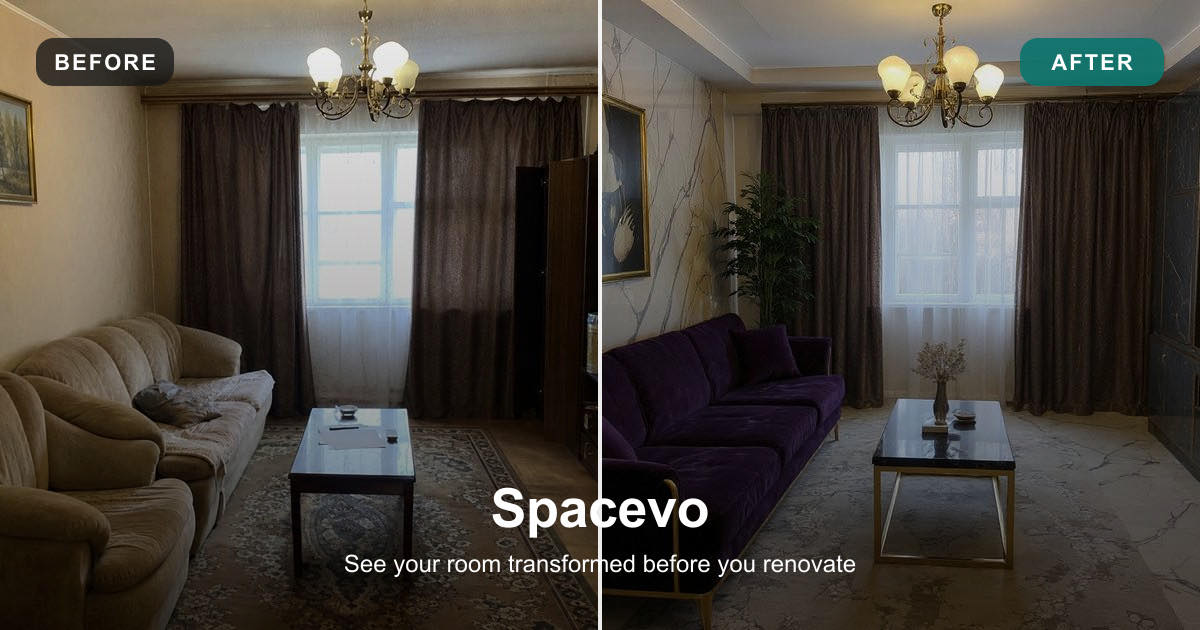
How to redesign a room from one photo (free), step by step
The workflow is nearly identical across tools. Here's the general version, then a walkthrough of doing it free with Spacevo.
1. Take a good photo first. The single biggest factor in output quality is the input. A blurry, dark, half-cropped photo gives the AI less to work with.
- Shoot in daylight or with the room lights on. Even, bright light beats moody lighting.
- Capture the whole room, or at least a full wall with the floor and ceiling edges visible. The AI needs to read the space.
- Stand square to the room, not at a sharp diagonal. A straight-on angle keeps the geometry clean.
- Clear obvious clutter. You don't need a spotless room, but a floor covered in laundry confuses the result.
2. Upload the photo. Drag it in or select it from your phone.
3. Pick a style. Modern, Scandinavian, Japandi, industrial, mid-century, coastal — most tools offer a menu. Pick one that fits the room's bones.
4. Generate and review. Wait a few seconds, then look at the result. Good tools keep your room's real structure — walls, windows, doorways, and the camera angle — and only change the furnishings and finishes.
5. Iterate if the tool lets you. Try a different style, or regenerate for a new take.
Doing it free with Spacevo
Spacevo (spacevo.io) gives you one free render with no credit card required, which is enough to run the full flow end to end.
Under the hood, Spacevo uses what it calls a Structure Engine to hold the room's original layout in place — the walls, windows, and viewpoint stay put while the furniture, colors, and decor change. That's what keeps the output looking like your room redesigned, rather than a generic AI photo that happens to be a living room.
The free path is: upload your photo, choose a style, and get one photorealistic redesign back. You see the complete experience — the same upload-to-result pipeline paid users get — capped at a single image. If that one render sells you on the idea, the paid plans open up more of them plus the heavier features.
Free tiers compared
Free allowances shift often, so treat the table as a snapshot. Always confirm on each tool's own site before you commit.
| Tool | Free allowance | Credit card to start? | What free lets you do |
|---|---|---|---|
| Spacevo | 1 free render | No | Full upload → style → photorealistic redesign, one image |
| REimagine Home | 5 free designs on signup, then up to ~30/mo free (limited) | No | Fairly generous free output on limited features |
| RoomGPT | ~1 free credit, then paid credits | Varies | A quick taste, then pay per credit (from ~$9/mo) |
| Collov AI | Free-forever tier (limited) | Varies | Ongoing limited free use, aimed at realtors |
| Interior AI | No free tier (as of mid-2026) | Yes | Paid only, from ~$29/mo |
Notes, all as of mid-2026 — check the site:
- Spacevo is the tightest free tier by count (one render) but the lowest friction, with no card required and the complete flow available.
- REimagine Home has the most generous free output of the group: 5 designs on signup and up to roughly 30 free outputs a month on limited features.
- RoomGPT starts you with about one free credit, then moves to paid credits from around $9/mo.
- Collov AI keeps a free-forever layer with limited quota, positioned toward real estate agents.
- Interior AI dropped its free tier and is now paid-only, starting around $29/mo. If you've read older guides that mention it being free, that's out of date.
Free AI design tools sit in the same family as the free and open-source AI tools you can run yourself: the entry point costs nothing, you test on your own terms, and you only invest once the tool proves it fits your workflow. Running a local model is free because you supply the hardware; a free render is free because the vendor is betting you'll upgrade once you're hooked. Either way, the free rung is there to be used.
Free vs paid: when it's worth upgrading
Free is genuinely enough for a lot of situations. Reach for the paid tier only when a specific limit gets in your way.
Free is fine when you're:
- Testing whether AI redesign is worth your time at all.
- Working on a single room and want one solid direction.
- Grabbing quick inspiration before a real renovation.
- Sharing a rough "what if" with a partner or roommate.
Paid starts to make sense when you need:
- Volume. Redesigning multiple rooms, or many variations of one room, burns through free credits fast.
- Commercial use. Listing a property, staging for a client, or anything you'll sell usually requires a paid license.
- Video. Turning a still redesign into a walkthrough clip is a paid feature almost everywhere.
- Inpainting. Editing just one part of a room — swap the sofa, keep everything else — needs local editing, which is paid.
- Virtual staging. Filling an empty room with furniture for a listing.
- HD downloads. Print- or listing-quality resolution without a watermark.
Spacevo's split is a clear example of where that line falls. The free render covers the core experience; paid plans add the count and the heavier tools. As of mid-2026 — check the site — its plans run Starter at $39/mo (40 credits, with render-to-video, HD downloads, and a commercial-use license), Pro at $79/mo (100 credits, adding a Precision Engine, inpainting, virtual staging, 360° panorama, and 4 variations per run), and Studio at $149/mo (190 credits). Annual billing is half price.
The practical read: if you're a homeowner deciding on one living room, free does the job. If you're a realtor staging listings every week, or a studio pushing out client concepts, the paid tier pays for itself in time saved. Start with the free render either way — there's no reason to pay before you've confirmed the output is what you want.
Tips to get better results for free
When you only have a render or two, each one counts. A few habits raise your hit rate.
Nail the photo before you upload. This is worth repeating because it matters most. Bright, even light. The whole room in frame. A straight-on angle. Tidy enough that the AI can read the space. A better input beats any amount of retrying with a bad one.
Match the style to the room. A tiny room won't magically become a loft. Pick a style that suits the actual proportions and light — Scandinavian and Japandi flatter small, bright rooms; industrial and dark modern suit larger spaces with good light. Choosing a fitting style gets you a usable result on the first try.
Be specific if the tool takes a prompt. "Warm minimalist living room, light oak floor, cream sofa, a few plants" gives the AI direction. Vague inputs give vague outputs. Name materials, colors, and a mood.
Do your comparison on the free renders. If you're weighing a couple of tools, run the same photo through each free tier and compare like for like. You'll quickly see which one keeps your room's structure and which one hallucinates a different space.
Screenshot and save. Free tiers often don't store your history. Save the render you like before you close the tab, especially if it's a one-shot free output.
Know when to stop. If two styles both look good, you've got what free is for — a direction. Don't burn credits chasing perfection the AI was never going to deliver on a free tier.
Frequently Asked Questions
Is AI interior design actually free, or is it a trial?
Both, depending on the tool. Some, like REimagine Home and Collov, keep an ongoing free tier with limited monthly output. Others, like Spacevo and RoomGPT, give you a small number of free renders as a genuine trial, then move to paid. Interior AI no longer has a free option at all (as of mid-2026). Read the free tier as a real sample of the product, capped in count, resolution, or features.
Do I need a credit card to try AI room design for free?
Not always. Spacevo's free render needs no credit card, and REimagine Home's free designs don't either. Some tools do ask for a card even on the free tier, so check before you sign up if you want to avoid that. No-card free tiers are the lowest-friction way to test.
Can free AI interior design tools keep my real room's layout?
The good ones can. Spacevo's Structure Engine holds the original walls, windows, doorways, and camera angle in place while changing furniture and finishes, so the result looks like your actual room redesigned. Quality varies by tool — this is exactly what you're testing when you run a free render.
What's the catch with free AI room design?
Usually one of: a small number of renders, lower resolution or watermarks, no video or local editing, and personal-use-only licensing. None of that blocks you from getting a real, usable redesign of a room or two. The limits kick in when you need volume, commercial use, or the heavier features.
How many photos do I need to redesign a room?
One. These tools are built around a single photo per room. Take the best shot you can of the whole space in good light, upload it, and you'll get a redesign back. Multiple angles of the same room can help you decide, but one solid photo is all the AI needs to work.
Free AI interior design is worth an afternoon of your time precisely because it costs nothing to find out. Take one good photo of the room that's been bugging you, run it through a no-card free tier like Spacevo's single free render, and see what the space could be. If the result earns it, that's when a paid plan makes sense — not before.
Try Gemma 4 online
~/gemma4 $ Try Gemma 4 in the browser playground before setting up a local installation.
Open Gemma 4 playground />


