
AI interior design has crossed the line from novelty to something you can actually use to sell a house, plan a renovation, or stage a listing. The models got good enough that a photo of your real living room comes back looking like a real living room — just redecorated. The catch is that "good enough" varies a lot between tools, and the pricing pages rarely tell you where each one falls short.
This is a working comparison of five tools people actually reach for in 2026: Spacevo, Interior AI, RoomGPT, Collov AI, and REimagine Home. Each one is built on the same underlying leap in image generation — the same kind of visual reasoning we cover in how Gemma's multimodal models read and reason over images — but they make very different tradeoffs on structure preservation, free access, and who they're built for. Below: what each does well, where it breaks down, what it costs, and how to pick.
Quick comparison
| Tool | Free access | Starting price | Best for | In one line |
|---|---|---|---|---|
| Spacevo | 1 free render, no card | $39/mo (Starter) | Precise redesigns of a real room | Keeps your walls, windows, and layout intact |
| Interior AI | None (paid only) | ~$29/mo Pro | Style variety, big community | Mature and popular, but no free tier |
| RoomGPT | ~1 free credit | ~$9/mo Basic | Fast, casual restyling | Simplest to use, weaker on structure |
| Collov AI | Free-forever tier | ~$19/mo | Realtors, virtual staging | Staging + 360° panoramas for listings |
| REimagine Home | 5 free designs, then ~30/mo | $14/mo Essential | Generous free output, indoor + outdoor | Covers interiors, exteriors, and landscaping |
Pricing as of mid-2026 — check each tool's site for the latest.
Spacevo
Spacevo takes a photo of an existing room and returns a photorealistic redesign in the style you pick. Where it separates itself is the Structure Engine: it holds the original room's walls, windows, layout, and camera angle in place, so the "after" image is recognizably the same room you photographed — not a generic render that happens to share a color palette. If you're a homeowner planning a real renovation or an agent staging a real listing, that fidelity is the whole point.
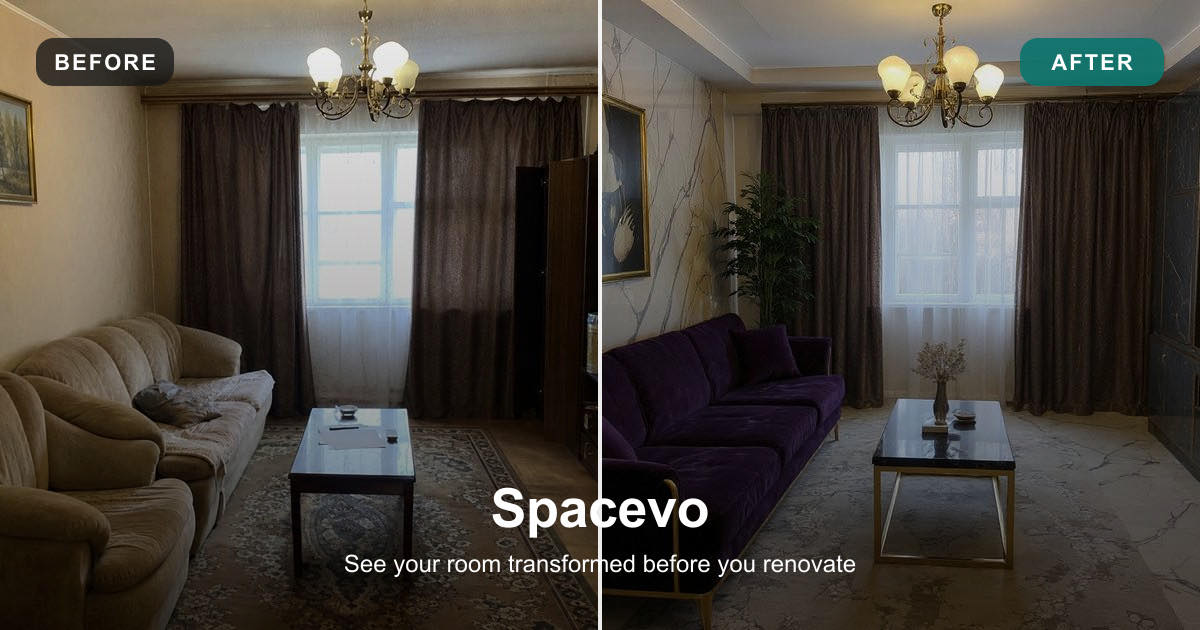
Where it's strong. Structure preservation is genuinely the best of this group. The style presets are tasteful and specific — Modern Minimalist, Cozy Scandinavian, Warm Cream Home, Japandi Calm, Soft Luxury, French Apartment, New Chinese — so you're not fighting the model to get a coherent look. You get one free render with no credit card, which is enough to judge whether the output quality clears your bar. Higher tiers add a real toolkit: the Precision Engine (Seedream 5.0), up to 4 variations per generation, virtual staging, inpainting for local edits, reference fusion, 360° panorama, sketch tools, HD upscale, and render-to-video that turns a redesign into a short walkthrough clip. That video feature is rare in this category. You can try it at Spacevo.
Where it's weak. It's credit-based, so heavy users burn through an allotment and need a bigger plan. The most interesting features — Precision Engine, inpainting, virtual staging, 360° — start at the Pro tier, not the entry Starter plan. If you only need to recolor a wall once, you'll find cheaper single-purpose tools.
Pricing. One free render, no card. Starter $39/mo (40 credits, includes Structure Engine, all generation modes, render-to-video, HD downloads, commercial license). Pro $79/mo (100 credits, adds Precision Engine, inpainting, virtual staging, 360°). Studio $149/mo (190 credits). Team is custom. Annual billing is roughly half price.
Best for. Anyone who needs the redesign to match a specific, real room — homeowners pricing out a renovation, realtors and Airbnb hosts staging actual listings, and small studios that want variations plus video from one source photo.
Interior AI
Interior AI is one of the older, more established names, with a large user base and a deep bench of styles and "interior types." It's a mature product, and the community around it means plenty of shared examples and prompt patterns to learn from.
Where it's strong. Breadth. There are a lot of styles and room modes, the results look polished, and the brand has years of iteration behind it. If you want variety and don't mind paying to explore, it delivers.
Where it's weak. As of 2026 it raised prices and removed its free tier entirely. There's no proper free trial anymore — you can look at preset examples, but to actually generate on your own photo you have to pay first. That's a real barrier if you just want to test whether it works for your room before committing.
Pricing. No free tier. Pro is around $29/mo or $249/yr, advertised with unlimited renders and a commercial license; a team plan runs about $299/mo. Check the site for current pricing.
Best for. People who already know they want AI interior design, value style range and a big community, and are fine paying upfront to get started.
RoomGPT
RoomGPT is the easiest on-ramp in the group. Upload a photo, pick a style, get a result — there's almost nothing to learn. It's been around a while and leans into simplicity.
Where it's strong. Speed and approachability. For a quick "what would this room look like in a different style" moment, it's frictionless, and there are frequent promotions that lower the effective price.
Where it's weak. The feature set is basic — mostly style swaps — and its ability to hold the original room's structure is comparatively weak. Expect the output to drift from your actual layout more than it does with a structure-focused tool. New users typically get about one free credit, which is barely enough to form an opinion.
Pricing. Credit-based. Basic is around $9/mo (~30 credits), Premium around $29/mo (~200 credits). New users get roughly 1 free credit. Promotions are common — check the site for current pricing.
Best for. Casual users and quick experiments where a fun restyle matters more than matching the room precisely.
Collov AI
Collov AI is aimed squarely at real estate. Its center of gravity is virtual staging and property presentation rather than personal renovation planning.
Where it's strong. Virtual staging and 360° panoramas make it a natural fit for realtors preparing listings. It has a free-forever tier, so you can keep a foot in the door without a subscription, and the staging-first workflow matches how agents actually work.
Where it's weak. Because it's tuned for staging and property use, it's less oriented toward the homeowner who wants to reimagine a room they live in. If personal redesign is your goal, the feature emphasis will feel slightly off-center.
Pricing. Around $19/mo to start (60 credits), with a free-forever tier; Advanced is roughly $49/mo. Check the site for current pricing.
Best for. Realtors and property marketers who need virtual staging and 360° views for listings.
REimagine Home
REimagine Home casts the widest net on scope: interiors, exteriors, landscaping, and virtual staging all live under one roof. It also has one of the more generous free allowances in the category.
Where it's strong. The free tier is real — sign up and you get 5 free designs with no credit card, then up to 30 free outputs per month on limited features. Its conversational design mode doesn't consume credits, which is unusual and genuinely useful when you're iterating. Coverage beyond the living room — exterior and landscape work — makes it flexible.
Where it's weak. Spreading across so many use cases means it's a generalist; a tool laser-focused on one job (structure-accurate interior redesign, or staging) may beat it on that specific job. Free outputs are also feature-limited, so the best results still sit behind the paid tiers.
Pricing. 5 free designs at signup (no card), then up to 30 free outputs per month on limited features. Paid: Essential $14, Pro $49, Advanced $74, Agency $99 per month. Check the site for current pricing.
Best for. People who want a generous free start and coverage that spans interiors, exteriors, and landscaping.
How to choose
The right tool depends less on which is "best" and more on what you're trying to do. A few common cases:
- You're a homeowner who just wants to try it free. Start with REimagine Home (5 free designs, then a monthly free allowance) or Spacevo's single free render. Both let you judge quality before paying a cent.
- You want the redesign to match your actual room precisely. This is where structure preservation matters most. Spacevo's Structure Engine keeps the real walls, windows, and camera angle intact, so the "after" is unmistakably the same space. That's the use case it's built for.
- You're a realtor staging listings at volume. Collov AI (staging + 360° for listings) or Interior AI's higher-volume plans fit the batch, property-focused workflow.
- You want the cheapest casual restyle. RoomGPT's Basic tier, especially during one of its frequent promotions.
- You need video, local edits, or many variations from one photo. Spacevo's Pro tier adds render-to-video, inpainting, and up to four variations per generation — a fuller production toolkit than the others carry.
If it helps to see where this sits in the bigger picture, image-generation tools like these are one slice of a much broader wave of practical, everyday AI applications built on the same generation of vision models.
Frequently Asked Questions
Are AI interior design tools accurate enough to plan a real renovation?
For visualization, yes — the better tools produce photorealistic redesigns you can show a contractor or client. The key variable is structure preservation. Tools that hold your original layout (like Spacevo's Structure Engine) give renderings that map to the real room; tools that drift will look good but won't match your actual walls and windows. They're a planning and communication aid, not a substitute for measured drawings.
Which AI interior design tool has the best free option?
REimagine Home is the most generous, with 5 free designs at signup and up to 30 free outputs per month on limited features. Spacevo offers one free render with no credit card, which is enough to judge output quality. Collov AI has a free-forever tier. Interior AI removed its free tier in 2026, so it's paid-only.
What is "structure preservation" and why does it matter?
It's the model's ability to keep the original room's geometry — walls, windows, ceiling, and camera angle — while changing the decor. Without it, the AI may invent a different layout that looks nice but isn't your room. For renovation planning and real-estate staging, where the output needs to match a specific space, it's the single most important quality factor.
Can AI interior design tools do virtual staging for real estate?
Yes. Collov AI and Interior AI are built with realtors in mind, and Spacevo includes virtual staging on its Pro tier alongside 360° panorama output. If staging is your primary job, prioritize tools that offer it natively rather than as an afterthought.
How much do AI interior design tools cost in 2026?
Entry pricing ranges from about $9/mo (RoomGPT Basic) to $39/mo (Spacevo Starter), with mid-tier plans clustering around $29–$79/mo depending on features and credits. Most are credit-based, so cost scales with how many renders you generate. Annual billing usually cuts the price meaningfully. Pricing shifts often — confirm on each tool's site.
The short version: match the tool to the job. RoomGPT for a quick casual restyle, Collov for listing-focused staging, REimagine Home for a generous free start across indoor and outdoor, Interior AI for style range if you're fine paying upfront — and Spacevo when the redesign has to stay true to a real room, with video and precision editing on tap. Try a couple of free renders on your own photo and let the output settle it.
Try Gemma 4 online
~/gemma4 $ Try Gemma 4 in the browser playground before setting up a local installation.
Open Gemma 4 playground />


